Why Next.js Is the Best Framework for Business Websites in 2026
If you're building a business website, web application, or SaaS product in 2026, the framework decision you make today will shape your product's performance, SEO visibility, and development velocity for years. After building dozens of production applications across industries — from fintech to healthcare to e-commerce — we've settled on Next.js as our default framework. Not because it's trendy, but because the data consistently shows it produces better business outcomes than every alternative we've tried.
This article isn't a Next.js tutorial. It's a business case — backed by performance data, SEO rankings, and development timelines from real projects — for why Next.js should be your default choice for any customer-facing web application in 2026.
The Problem with Traditional Approaches
Before we explain why Next.js wins, let's understand what it's replacing and why those alternatives fall short for modern business requirements.
WordPress: The Legacy Tax
WordPress powers roughly 43% of the web. It's familiar, it has a massive plugin ecosystem, and any developer can spin up a WordPress site in hours. But for business-critical applications, WordPress carries a hidden tax that compounds over time.
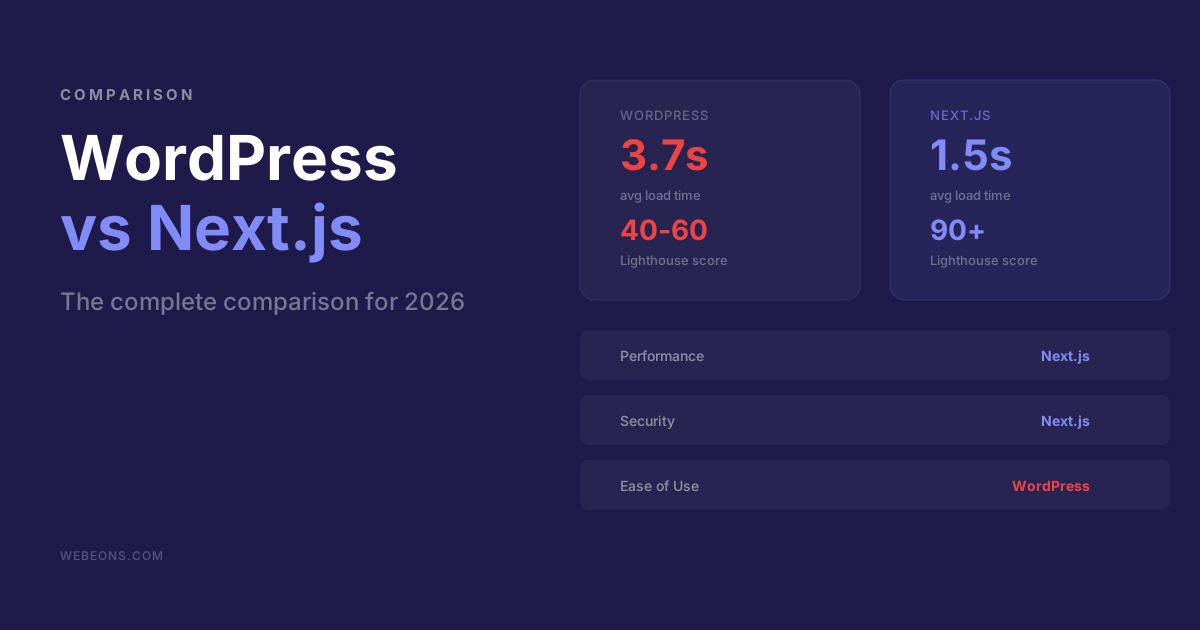
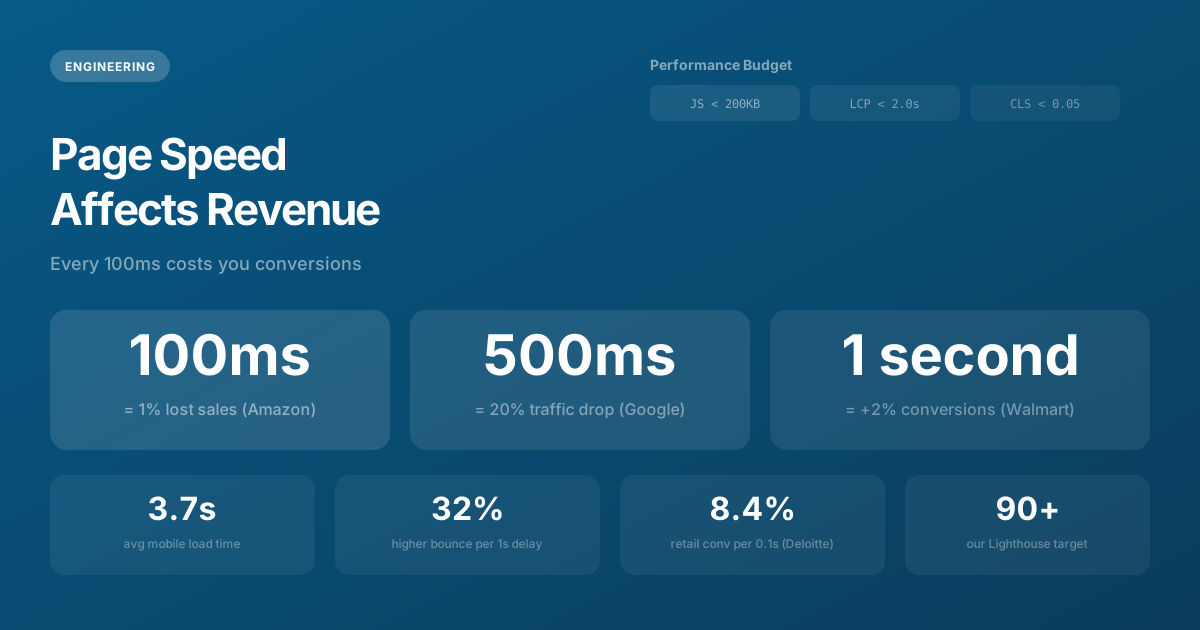
The average WordPress site loads in 3.7 seconds on mobile — compared to 1.2 seconds for an optimized Next.js application. In an era where Google's Core Web Vitals directly affect search rankings, that 2.5-second gap is the difference between page one and page three. Every additional second of load time increases bounce rate by 32% (Google, 2024).
WordPress's plugin architecture is both its greatest strength and its Achilles heel. The average WordPress site runs 20-30 plugins, each adding JavaScript, CSS, and database queries. Plugin conflicts cause roughly 52% of all WordPress site crashes (Jetstress, 2024). Security vulnerabilities in plugins account for 98% of WordPress exploits (WPScan, 2025). Every plugin is a dependency you don't control — maintained by someone else, on their timeline, with their quality standards.
For a brochure site that rarely changes, WordPress is fine. For a business that depends on web performance, SEO, and reliability, it's a liability disguised as a convenience.
Client-Side SPAs: The SEO Black Hole
Single-page applications built with vanilla React (Create React App, Vite) solve the performance and flexibility problem but create a new one: they're invisible to search engines by default. Client-side rendering means Google sees a blank page until JavaScript downloads, parses, and executes — which can take 3-5 seconds on mobile devices.
Google claims its crawler can execute JavaScript, and it can — eventually. But there's a crawl budget delay. JavaScript-rendered pages may not be indexed for days or weeks after publication. For time-sensitive content like product launches, blog posts, or campaign landing pages, that delay is a deal-breaker.
The result is a common pattern we see in audits: a beautifully designed React SPA with zero organic traffic because Google literally can't see the content when it crawls the page.
Static Site Generators: The Rebuild Problem
Gatsby and older SSG tools solved SEO by pre-rendering pages at build time. But as sites grow, build times balloon. A 500-page Gatsby site might take 15-20 minutes to rebuild. Adding a single blog post triggers a full rebuild. For e-commerce sites with thousands of product pages that change daily, static site generation simply doesn't scale.
Why Next.js Wins: The Technical Case
Server Components: 60-80% Less JavaScript
React Server Components, introduced in Next.js 13 and now mature in version 16, are the single most impactful performance innovation in frontend development in the past five years. The concept is elegant: components render on the server by default, sending only HTML to the browser. Interactive components explicitly opt into client-side rendering with the "use client" directive.
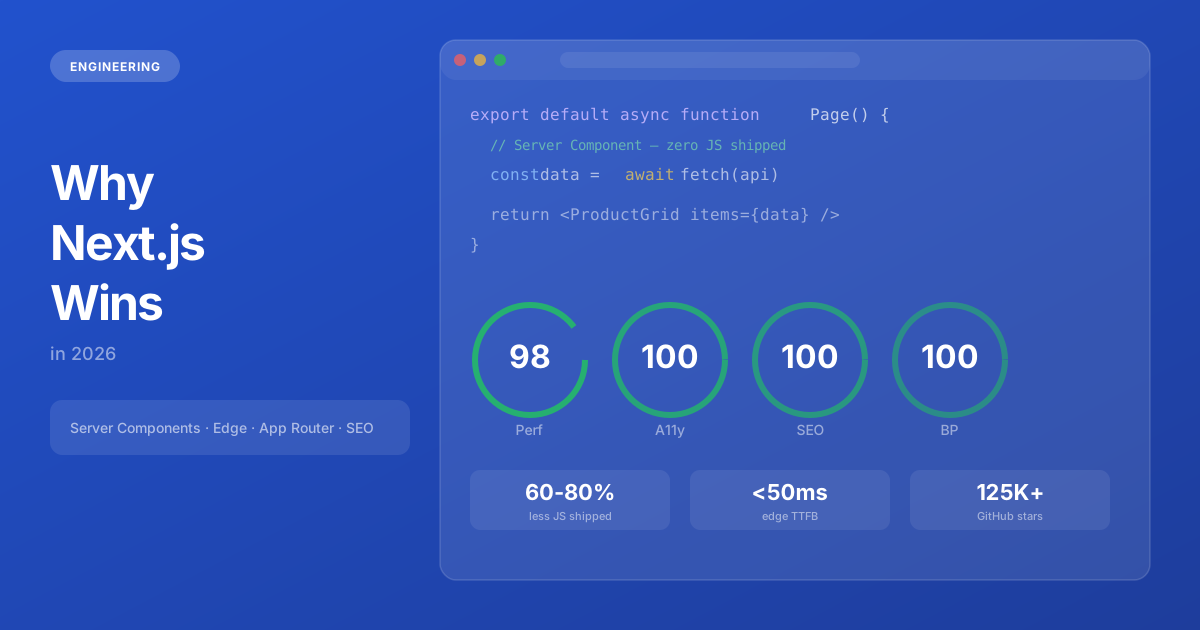
The practical impact is dramatic. A typical Next.js 16 page sends 60-80% less JavaScript to the browser compared to a traditional React SPA. Consider a product page that fetches data from an API, renders a product description, displays reviews, and has an "Add to Cart" button. In a traditional SPA, the entire page — data fetching logic, rendering logic, even the database query library — ships as JavaScript to the browser. With Server Components, only the "Add to Cart" button's interaction logic reaches the client. Everything else is server-rendered HTML.
// Server Component — runs on the server, zero JS sent to browser
async function ProductPage({ params }: { params: { id: string } }) {
  // This database call never reaches the client's browser
  const product = await db.product.findUnique({
    where: { id: params.id },
    include: { reviews: true, variants: true },
  });

  return (
    <main>
      <h1>{product.name}</h1>
      <p>{product.description}</p>
      <ReviewsList reviews={product.reviews} />  {/* Server Component */}
      <AddToCartButton id={params.id} />          {/* Client Component — only this ships JS */}
    </main>
  );
}

// Only 2KB of JavaScript for the interactive button
// vs 150KB+ for the entire page in a traditional SPA
Less JavaScript means faster page loads, better Lighthouse scores, lower data usage for mobile users, and improved conversion rates. The correlation between JavaScript bundle size and Time to Interactive is nearly linear — every 100KB of JavaScript adds approximately 350ms of load time on a mid-range mobile device.
Rendering Strategies: The Right Tool for Each Page
Next.js doesn't force you into a single rendering strategy. Each page can independently choose the approach that best fits its requirements:
- Static Generation (SSG) — Pre-rendered at build time. Perfect for landing pages, blog posts, and documentation that don't change frequently. Served from CDN edge nodes with zero server processing per request.
- Server-Side Rendering (SSR) — Rendered on each request with fresh data. Ideal for pages that need real-time data like dashboards, search results, or personalized content.
- Incremental Static Regeneration (ISR) — The best of both worlds. Pages are statically generated but automatically revalidate after a configurable interval. An e-commerce product page might revalidate every 60 seconds — fast enough to reflect price changes, without the cost of SSR on every request.
- Streaming SSR — The page shell renders immediately while slower data (reviews, recommendations) streams in progressively. Users see content instantly, and the page fills in without layout shifts.
This flexibility is unique to Next.js. Most frameworks force a single rendering strategy across the entire application. The ability to choose per-page means you can optimize each page for its specific requirements without compromising the rest of the application.
Edge Rendering: Global Sub-50ms Performance
Traditional server-side rendering has a latency problem: if your server is in Virginia and your user is in Tokyo, every page request travels 12,000 kilometers round-trip. Even at the speed of light, that's 80ms of pure physics-imposed latency — before your server even starts processing the request.
Edge rendering solves this by deploying your application to data centers worldwide. When deployed on Vercel's Edge Network (30+ regions globally) or Cloudflare Workers (300+ locations), your server code runs on the nearest node to each user. A user in Mumbai gets their page rendered in Mumbai. A user in São Paulo gets their page rendered in São Paulo. Time to First Byte drops from 400ms+ to under 50ms globally.
For international businesses, edge rendering isn't a nice-to-have — it's the difference between a fast site for your home market and a fast site for every market.
Built-in SEO That Enforces Best Practices
Next.js doesn't just support SEO — it enforces best practices through its architecture. This distinction matters. WordPress supports SEO through plugins like Yoast, which means SEO is additive — you have to remember to install, configure, and maintain it. In Next.js, SEO fundamentals are structural — they're part of how you build the application.
The Metadata API
Every page in a Next.js application exports a metadata object or generateMetadata function that produces proper HTML head elements: title tags, meta descriptions, Open Graph tags for social sharing, Twitter card markup, canonical URLs, and structured data. These are type-checked by TypeScript, which means you'll get a build error if you forget a required field or mistype a property name.
// Type-safe SEO metadata — errors if required fields are missing
export const metadata: Metadata = {
  title: "Enterprise Web Development | Webeons Technologies",
  description: "Production-grade web applications built with Next.js...",
  alternates: { canonical: "https://webeons.com/services" },
  openGraph: {
    title: "Enterprise Web Development",
    description: "Production-grade web applications...",
    type: "website",
    images: ["/og-image.png"],
  },
};
Automatic Sitemap and Robots
The sitemap and robots.txt are generated from code — sitemap.ts and robots.ts files that export structured data. When you add a new page, the sitemap updates automatically on the next build. No manual XML editing, no plugin configuration, no forgetting to update after a content change.
Dynamic OG Images
Next.js generates Open Graph images dynamically using the ImageResponse API. Instead of manually creating social sharing cards in Figma for every page, you write a React component that generates a branded image with the page's title and description. When someone shares your page on Twitter or LinkedIn, they see a polished, branded preview card — automatically, for every page.
The Developer Velocity Advantage
Beyond performance and SEO, Next.js dramatically accelerates development speed. This translates directly to lower project costs and faster time-to-market.
File-System Routing
No route configuration files. Create a file at app/about/page.tsx and you have a route at /about. Create a file at app/blog/[slug]/page.tsx and you have dynamic routes for every blog post. Nested layouts, loading states, and error boundaries are handled by convention — layout.tsx, loading.tsx, error.tsx in any directory.
Full-Stack in One Project
API routes, server actions, database queries, and frontend components all live in the same codebase. No separate backend repository, no API version mismatches, no deployment coordination between frontend and backend teams. For small-to-medium teams (which describes most businesses), this simplicity is a force multiplier.
Measurable Time Savings
For our team, the velocity difference is measurable: projects that would take 16 weeks in a custom React + Express setup consistently ship in 10-12 weeks with Next.js. That's not a marginal improvement — it's a structural advantage that compounds over the life of every project.
The Ecosystem and Community
Next.js isn't just a framework — it's the center of a thriving ecosystem. Vercel (the company behind Next.js) raised $250M at a $3.5B valuation, ensuring long-term development and support. The framework has 125,000+ GitHub stars and over 3,000 contributors. Major companies — Netflix, TikTok, Hulu, Nike, Twitch, The Washington Post — use it in production.
This ecosystem means problems are solved quickly. When you hit an edge case, chances are someone else has encountered it — and the solution is documented. Third-party libraries integrate seamlessly. Hiring developers with Next.js experience is easier than ever because it's the most popular React framework by a wide margin.
When Next.js Isn't the Right Choice
Honesty matters more than framework evangelism. Next.js isn't ideal for every project:
- Internal dashboards with no SEO requirements — A Vite + React SPA is simpler and sufficient when search engines will never see the application.
- Native mobile applications — React Native or platform-native (Swift/Kotlin) are the right tools. Though Next.js excels as the web companion to a mobile app.
- Teams deeply invested in Vue or Svelte — Nuxt (Vue) and SvelteKit offer comparable benefits in their respective ecosystems. The framework-switching cost may not justify the migration.
- Extremely simple static sites — A five-page marketing site with no interactivity might be over-engineered in Next.js. Though we'd argue the SEO benefits still make it worthwhile.
The Bottom Line
Next.js isn't just a React framework — it's a full-stack platform for building modern web applications. Server Components reduce client JavaScript by 60-80%. Edge rendering delivers sub-50ms response times globally. Built-in SEO tools eliminate the need for plugins and workarounds. And the developer experience means faster shipping without sacrificing quality.
Every new project at Webeons starts with Next.js. Not because it's trendy — frameworks come and go. But because after years of building production applications, the data consistently shows it produces better outcomes for our clients: faster sites, higher search rankings (see our performance and revenue analysis), shorter development timelines, and lower long-term maintenance costs.
The framework decision shapes everything that follows. Choose the one with the data behind it.
Need help with this?
We build exactly what this article describes — production-grade digital products for ambitious companies.
Start a Project →