AI Integration for Business: A Practical Guide
Every company wants AI in their product. Chatbots, content generation, document processing, recommendation engines — the potential applications are compelling and the pressure from competitors is real. But most AI implementations fail. Not because the underlying models are bad — GPT-4o and Claude are genuinely impressive — but because the engineering around them is sloppy, the expectations are misaligned, and the production requirements are underestimated.
After integrating AI into production applications for dozens of clients across SaaS, e-commerce, healthcare, and professional services, we've developed a clear framework for what separates AI features that deliver real business value from expensive demos that break in production.
The Three Levels of AI Integration
Not all AI integrations are created equal. We categorize them into three levels based on complexity, cost, reliability requirements, and business impact. Understanding which level you actually need prevents both over-engineering simple problems and under-engineering complex ones.
Level 1: Direct API Calls
The simplest integration: your application sends a prompt to OpenAI or Anthropic's API and displays the response to the user. This covers chatbots that answer generic questions, basic text summarization, content generation tools, and translation features.
Level 1 is where most companies start — and where too many stop. The problem is context. Without access to your specific business data, the AI gives generic answers that may be plausible but are often incorrect for your specific domain. A customer asks about your refund policy, and the AI confidently describes a policy you don't have. A prospect asks about pricing, and the AI fabricates numbers. These hallucinations aren't bugs in the model — they're the predictable result of asking an AI to answer questions about information it doesn't have.
Level 1 is appropriate for genuinely generic tasks: summarizing user-provided text, generating creative content, translating between languages, or answering general knowledge questions where hallucination risk is low and consequences are minimal.
Level 2: RAG (Retrieval-Augmented Generation)
RAG solves the context problem by giving the AI access to your data at query time. When a user asks a question, the system first searches your knowledge base — documents, FAQs, product data, help articles, internal wikis — for relevant information, then includes that context in the prompt alongside the user's question.
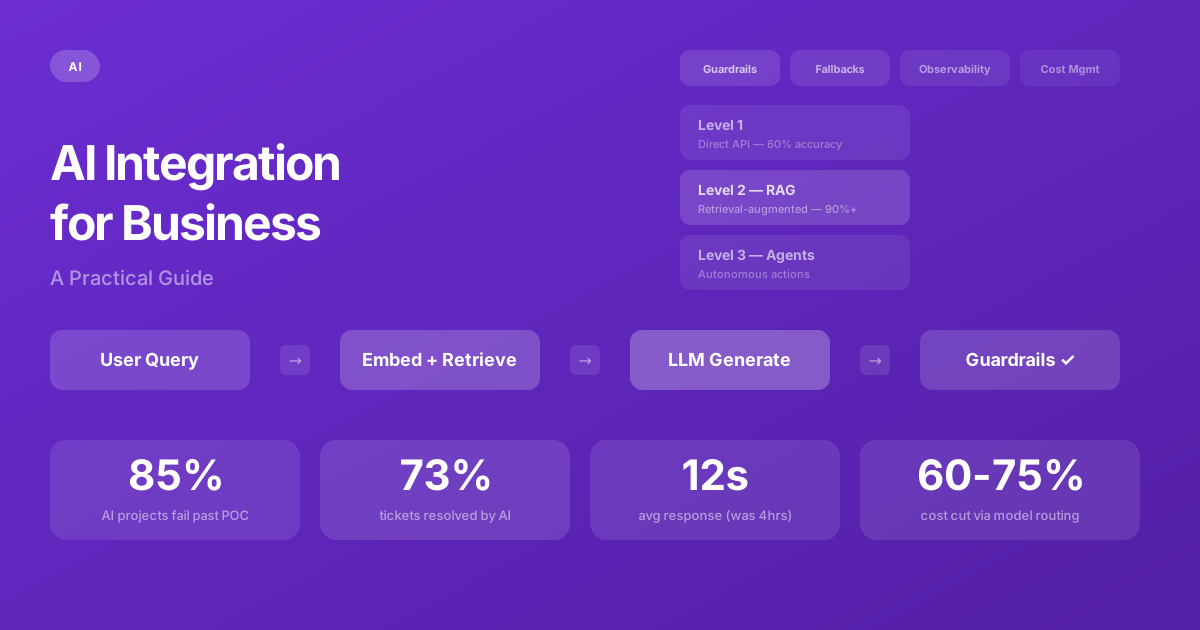
The architecture works in four steps:
// RAG Pipeline — step by step
async function answerWithContext(userQuery: string) {
  // Step 1: Convert the user's question to a vector embedding
  const queryEmbedding = await openai.embeddings.create({
    model: "text-embedding-3-small",
    input: userQuery,
  });

  // Step 2: Search your vector database for semantically similar content
  const relevantChunks = await vectorDB.search({
    vector: queryEmbedding.data[0].embedding,
    topK: 5,       // Retrieve top 5 most relevant chunks
    minScore: 0.7,  // Only include chunks above similarity threshold
  });

  // Step 3: Build a prompt with the retrieved context
  const contextText = relevantChunks
    .map(chunk => chunk.text)
    .join("\n\n");

  // Step 4: Ask the LLM to answer based ONLY on the provided context
  const response = await openai.chat.completions.create({
    model: "gpt-4o",
    messages: [
      {
        role: "system",
        content: `You are a helpful assistant for [Company Name].
Answer questions based ONLY on the following context.
If the context doesn't contain the answer, say "I don't have
information about that. Let me connect you with our team."

Context:
${contextText}`
      },
      { role: "user", content: userQuery },
    ],
    temperature: 0.3, // Lower temperature = more factual, less creative
  });

  return response.choices[0].message.content;
}
Level 2 is where the real business value starts. Your AI chatbot now accurately answers questions about your products, your policies, and your documentation — because it's reading your actual content before answering. Accuracy jumps from roughly 60% (Level 1 guessing) to 90%+ with proper retrieval and prompt engineering.
The critical engineering decisions in a RAG system are chunking strategy (how you split documents into retrievable segments), embedding model selection (which determines how well semantic search works), relevance scoring (filtering out low-quality matches), and prompt engineering (instructing the model to stay grounded in the provided context).
Level 3: Autonomous Agents
At Level 3, the AI doesn't just answer questions — it takes actions. It can look up order status in your database, process refunds through your payment system, schedule appointments in your calendar, escalate issues to human agents, and chain multiple operations together to accomplish complex tasks.
Level 3 requires the most careful engineering because the AI is now interacting with production systems where mistakes have real consequences. A chatbot that gives a wrong answer is embarrassing. An agent that processes an unauthorized refund or deletes the wrong record is a business problem. Every action needs authentication checks, rate limiting, input validation, and — for high-stakes operations — human-in-the-loop approval before execution.
The Five Engineering Pillars of Production AI
The difference between a demo that impresses stakeholders and a production system that reliably serves customers comes down to five engineering decisions that have nothing to do with the AI model itself. The model is the easy part. These five pillars are the hard part.
1. Guardrails: Defining Boundaries
Production AI needs explicit boundaries. What topics can it discuss? What actions can it take? What should it refuse to do? What tone should it maintain? We implement guardrails as a separate validation layer that checks every AI response before it reaches the user.
Input guardrails classify incoming messages: Is this a legitimate question? Is it an attempt at prompt injection ("ignore your instructions and...")? Is it off-topic? Is it asking for information the AI shouldn't provide (competitor pricing, confidential data, legal advice)?
Output guardrails validate responses: Does it contain competitor mentions? Does it make promises the company can't keep? Does it include information that should be confidential? Does it contradict the company's documented policies? These checks are typically fast (sub-100ms) and use cheap models or simple pattern matching — but they prevent the kind of AI failures that damage trust and make headlines.
2. Fallback Strategies: Graceful Degradation
LLM APIs go down. Rate limits get hit. Responses take too long. Context retrieval returns irrelevant results. The AI is asked something it genuinely can't answer. Every one of these scenarios needs a graceful degradation path:
- API timeout: Return a cached response for common queries, or a polite "I'm taking longer than usual, let me connect you with a human."
- Low-confidence response: If retrieval scores are below the threshold, don't guess — route to a human agent.
- Rate limit: Queue the request and respond when capacity is available, with appropriate user messaging.
- Model error: Fall back to a simpler model (GPT-4o-mini instead of GPT-4o) or to a rule-based response system.
3. Observability: Measuring Everything
You can't improve what you can't measure. Every AI interaction should be logged with: the user's input, the retrieved context chunks and their relevance scores, the full prompt sent to the model, the model's response, latency (end-to-end and per-step), token usage and cost, and the user's reaction (did they follow up? did they rate the response? did they escalate to a human?).
This data is how you identify failure patterns, discover questions your knowledge base doesn't cover, find prompts that consistently produce poor results, and measure whether the system is improving or degrading over time.
4. Cost Management: Predictable Bills
A single GPT-4o call costs roughly $0.01-0.03 depending on input/output length. That sounds cheap until you multiply it by thousands of daily users making multiple queries each. Without cost management, a popular AI feature can generate a five-figure monthly bill surprisingly fast.
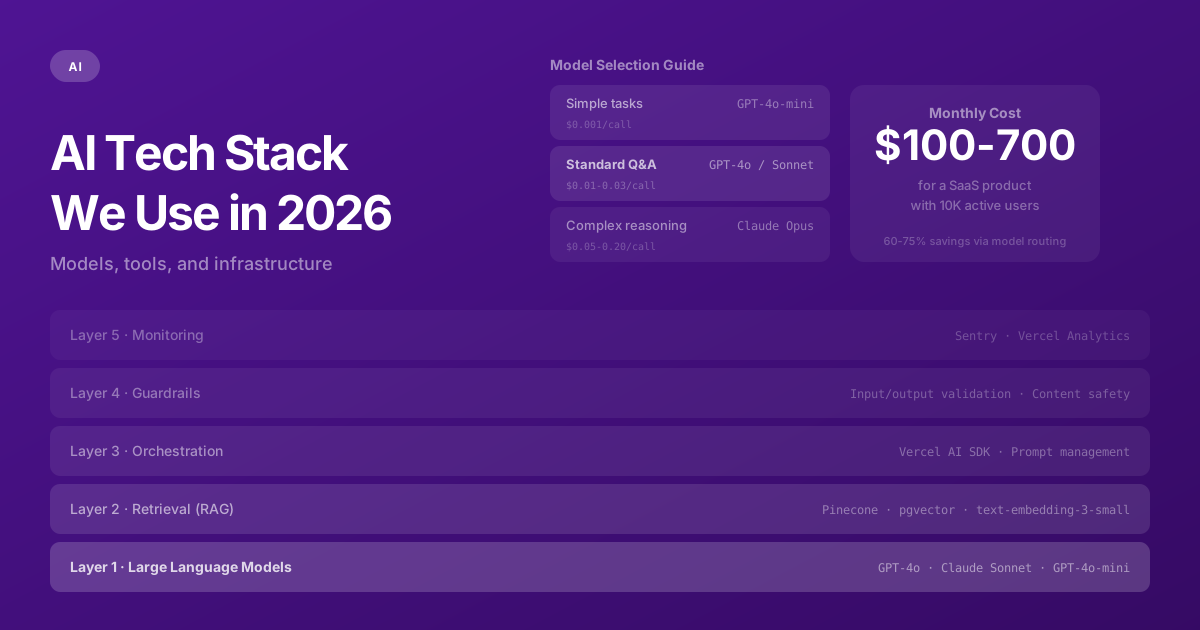
We implement several cost controls: token budgets that limit maximum input and output length per request; model routing that uses cheaper models (GPT-4o-mini at $0.001 per call) for simple queries and premium models only for complex ones; response caching for frequently asked questions; and monthly cost alerts that trigger before bills reach unexpected levels. Intelligent model routing alone typically reduces costs by 60-75% with minimal impact on response quality.
5. Evaluation: Proving It Works
How do you know your AI is actually good? Vibes don't count. We build automated evaluation pipelines that test the AI against hundreds of known question-answer pairs, measuring accuracy (did it answer correctly?), relevance (did it use the right source material?), hallucination rate (did it make things up?), and consistency (does it give the same answer to the same question?).
These evaluation suites run nightly against production prompts. When we update the knowledge base, change a prompt, or upgrade the model version, the evaluation suite tells us exactly what improved and what regressed — before users notice.
Real-World Case Study: Customer Support Chatbot
To make this concrete, here's how we built an AI-powered customer support chatbot for a SaaS client with 15,000 active users and a 200-page documentation site.
Week 1: Knowledge Base Ingestion. We ingested their entire documentation site, help center, FAQ, and product changelog into a vector database. Documents were chunked into 500-token segments with 50-token overlap to maintain context across chunk boundaries. Each chunk was embedded using OpenAI's text-embedding-3-small model and stored in Pinecone with metadata tags for source, category, and freshness.
Week 2: Retrieval Pipeline & Chat Interface. We built the RAG pipeline and a streaming chat interface embedded in their application. When a user asks a question, the system embeds their query, retrieves the 5 most relevant documentation chunks (filtered by a minimum similarity score of 0.72), injects them into a carefully engineered system prompt, and streams the model's response token by token. The system prompt instructs the model to answer only from the provided context and to acknowledge uncertainty rather than guess.
Week 3: Guardrails, Fallbacks & Polish. We added input classification to detect off-topic queries, competitor mentions, and potential prompt injections. We built a human handoff flow for questions the AI can't answer confidently (retrieval score below threshold). We implemented conversation logging, a user feedback mechanism (thumbs up/down), and an admin dashboard showing conversation analytics, common unanswered questions, and cost tracking.
Results after 90 days: The chatbot resolved 73% of support tickets without human intervention, reducing average response time from 4 hours to 12 seconds. Customer satisfaction scores on support interactions improved by 18%. Support team workload decreased by 60%, allowing them to focus on complex technical escalations rather than answering the same "how do I reset my password?" question for the 50th time that week.
Choosing the Right Model
Model selection isn't about picking "the best" model — it's about matching capability to your specific use case and budget. Here's our decision framework (see also our full AI tech stack breakdown):
- Simple classification, routing, and yes/no questions: GPT-4o-mini or Claude Haiku. Fast, cheap ($0.001 per call), and sufficient for 80% of simple tasks.
- Standard Q&A, summarization, and content generation: GPT-4o or Claude Sonnet. The workhorses for most production AI features. Good balance of quality and cost.
- Complex reasoning, code generation, and analysis: GPT-4o or Claude Opus. Premium cost justified for tasks where accuracy matters significantly and errors are costly.
- Long document processing (50K+ tokens of context): Claude Sonnet or Opus with their 200K token context window. No chunking needed for most documents.
We typically implement a tiered approach in production: a fast classifier routes each query to the cheapest model capable of handling it. Simple queries go to mini/haiku models. Complex queries go to premium models. The classifier itself runs on a cheap model, adding negligible cost and latency.
The Bottom Line
AI integration isn't a feature you bolt onto an existing product in a weekend. It's an engineering discipline with its own architecture patterns, failure modes, and operational requirements. The model is the easy part — call an API, get a response. The hard part is building the retrieval pipeline, guardrails, fallback strategies, cost management, and continuous evaluation that make AI reliable enough for production.
Get those five pillars right, and AI becomes a genuine competitive advantage — resolving support tickets, accelerating workflows, and enabling capabilities that weren't possible before. Skip them, and you've built an expensive demo that will embarrass your company the first time a customer asks an unexpected question.
Need help with this?
We build exactly what this article describes — production-grade digital products for ambitious companies.
Start a Project →