Technical SEO Checklist: 20 Things Most Agencies Miss
Most SEO agencies focus on content and backlinks. They're not wrong — those matter. But they're ignoring the foundation: technical SEO. If your site is slow, poorly structured, or difficult for search engines to crawl, no amount of content will save your rankings. Here are 20 technical SEO items we check on every project.
Core Web Vitals (Items 1-4)
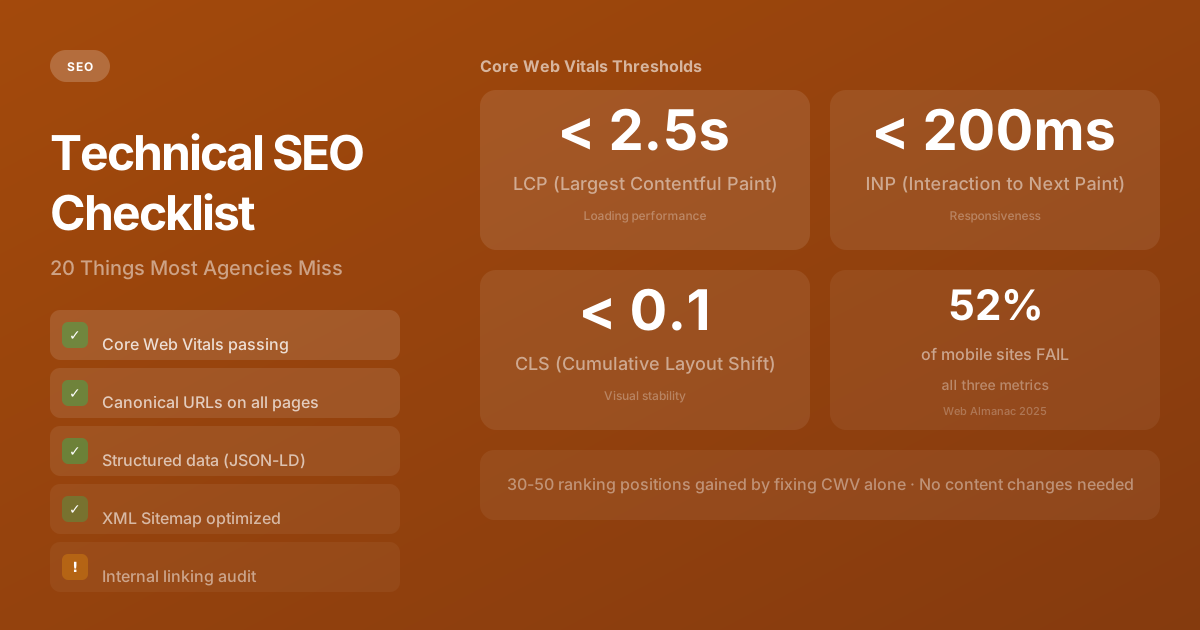
1. Largest Contentful Paint (LCP) under 2.5 seconds
LCP measures how fast the main content of your page loads. Google considers anything under 2.5 seconds "good." Common fixes: optimize images, preload critical fonts, use server-side rendering, and eliminate render-blocking JavaScript.
2. Interaction to Next Paint (INP) under 200ms
INP replaced FID in 2024 as Google's responsiveness metric. It measures how quickly your page responds to user interactions — clicks, taps, keyboard input. Heavy JavaScript bundles are the usual culprit. Tree-shaking, code splitting, and reducing third-party scripts are the fix.
3. Cumulative Layout Shift (CLS) under 0.1
CLS measures visual stability — how much content jumps around as the page loads. Set explicit width and height attributes on images and videos. Use font-display: swap with proper font fallback sizing. Reserve space for dynamic content like ads.
4. Time to First Byte (TTFB) under 800ms
While not officially a Core Web Vital, TTFB directly impacts LCP. If your server takes 2 seconds to respond, your LCP can't be under 2.5 seconds. Edge rendering, CDN caching, and database query optimization are the primary levers.
Crawlability & Indexation (Items 5-10)
5. Clean XML Sitemap
Your sitemap should list every page you want indexed — and nothing else. We audit sitemaps that contain 404 pages, redirected URLs, and noindexed content regularly. Each invalid entry wastes crawl budget and signals poor technical hygiene to search engines. No 404s, no redirects, no noindexed pages. Update it automatically when content changes. In Next.js, generate it from code using sitemap.ts.
6. Proper Robots.txt
Allow crawling of all public pages. Block admin routes, API endpoints, and staging environments. Include a reference to your sitemap. Test it with Google Search Console's robots.txt tester.
7. Canonical URLs on Every Page
Every page should declare its canonical URL to prevent duplicate content issues. This is especially critical for pages accessible at multiple URLs (with/without trailing slashes, with/without www, with query parameters).
8. No Orphan Pages
Every important page should be reachable through at least one internal link. Pages that exist in your sitemap but have no internal links pointing to them are "orphans" — search engines will eventually stop crawling them.
9. Crawl Budget Optimization
Large sites need to be deliberate about what gets crawled. Block low-value pages (search results, filtered views, paginated archives) from being crawled. Ensure high-value pages are crawled frequently by linking to them prominently.
10. Proper HTTP Status Codes
404 for missing pages, 301 for permanent redirects, 302 for temporary. Never serve a soft 404 (a page that says "not found" but returns a 200 status). Google treats these as real pages, wasting your crawl budget.
On-Page Technical SEO (Items 11-16)
11. One H1 Per Page
Every page should have exactly one H1 tag containing the primary keyword. H2s and H3s should follow a logical hierarchy. This isn't just for search engines — it's essential for accessibility and screen readers.
12. Structured Data (JSON-LD)
Add schema.org structured data for Organization, WebSite, Article (for blog posts), FAQ, Product, and BreadcrumbList. This enables rich snippets in search results — star ratings, FAQ dropdowns, breadcrumb trails — which significantly improve click-through rates.
13. Meta Descriptions That Convert
Every page needs a unique meta description between 120-160 characters. Include the primary keyword naturally. Write it as a value proposition, not a summary — it's an ad for your page in search results.
14. Image Optimization
Use next-gen formats (WebP, AVIF). Compress aggressively. Serve responsive sizes with srcset. Add descriptive alt text to every image — both for SEO and accessibility. Lazy-load below-fold images.
15. Internal Linking Strategy
Link related pages to each other with descriptive anchor text — not "click here." Create topic clusters where a pillar page links to detailed sub-topic pages and vice versa. This distributes page authority and helps search engines understand your content hierarchy.
16. URL Structure
URLs should be short, descriptive, and include the target keyword. Use hyphens to separate words. Avoid query parameters, session IDs, and unnecessary subdirectories. /blog/technical-seo-checklist beats /blog/2026/03/post?id=847.
Performance & Infrastructure (Items 17-20)
17. HTTPS Everywhere
Non-negotiable. Every page, every resource, every redirect should use HTTPS. Mixed content warnings destroy trust and search engines penalize insecure sites.
18. Mobile-First Design
Google uses mobile-first indexing — it evaluates your mobile site, not your desktop site. If your mobile experience is degraded, your rankings suffer regardless of how good your desktop site looks.
19. Eliminate Render-Blocking Resources
CSS and JavaScript that block the initial render delay LCP. Inline critical CSS, defer non-critical scripts, and use async or defer attributes on script tags. In Next.js, this is handled automatically through the framework's optimization pipeline.
20. Monitor with Google Search Console
Set up Google Search Console on day one. Monitor coverage reports for indexing issues, check Core Web Vitals for performance regressions, and review search queries to understand what's working. This isn't a "set and forget" tool — check it weekly.
The Payoff
Technical SEO isn't glamorous, but it's the foundation that content and backlinks build on. Fix these 20 items and you've eliminated the most common technical barriers to ranking. The content can do its job when the infrastructure supports it.
Need help with this?
We build exactly what this article describes — production-grade digital products for ambitious companies.
Start a Project →