How We Build a SaaS Product from Scratch in 12 Weeks
Building a SaaS product from scratch is daunting. There are a thousand decisions to make — authentication strategy, database schema, multi-tenancy architecture, billing integration, deployment pipeline — and getting any of them wrong early creates expensive technical debt that compounds with every feature you build on top. We've refined our process over dozens of projects into a disciplined 12-week sprint from discovery to production launch.
This article walks through our exact process, week by week, including the technical decisions we make, the tools we use, and the principles that keep projects on track and on budget.
Weeks 1-2: Discovery & Architecture
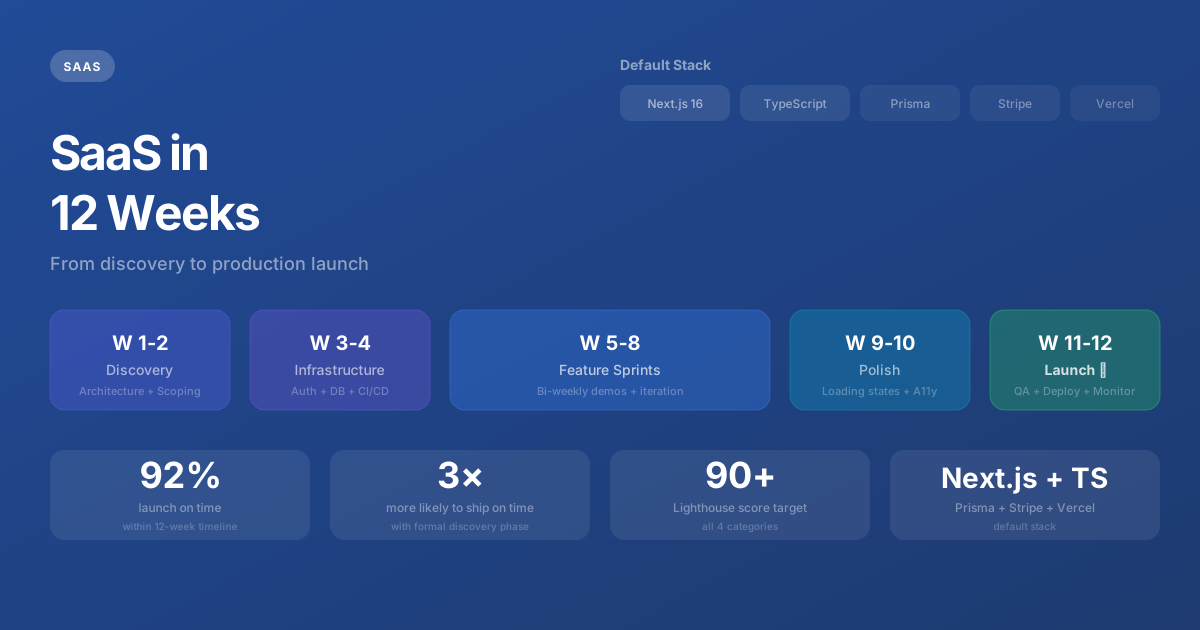
We don't write production code in week one. We write documents. This might seem counterintuitive when the clock is ticking on a 12-week timeline, but the discovery phase is the highest-leverage investment in the entire project. Projects with a formal discovery phase are 3× more likely to launch on time (PMI, 2024). Projects that skip it almost universally require rewrites within the first six months.
The Three Discovery Artifacts
Discovery produces three documents that shape every subsequent decision:
1. Technical Architecture Document. This defines the framework (Next.js 16), language (TypeScript strict mode), hosting (Vercel), database strategy (PostgreSQL via Supabase or Neon), caching layer (Redis where needed), and third-party integrations (Stripe for billing, Resend for email, Clerk or NextAuth for auth). Each choice is justified — not just listed. We document why we chose PostgreSQL over MongoDB, why Stripe over Paddle, why Vercel over AWS directly. These decisions are hard to change later, so we want the client to understand and agree with them upfront.
2. Database Schema. The database schema is the skeleton of your product. Get relationships wrong — a user has many organizations vs. belongs to one organization, for example — and you'll spend weeks refactoring in month three. We design the schema for the V2 feature set, not just V1. That doesn't mean building V2's features — it means ensuring the data model can accommodate them without a migration nightmare.
3. Prioritized Feature Map. We use MoSCoW prioritization: Must have (V1 launch blockers), Should have (first month post-launch), Could have (quarter two), Won't have (explicitly descoped). The Must-haves define the 12-week scope. Everything else is documented but deliberately excluded from the timeline and price.
Our Default Tech Stack
We're opinionated about tools because opinions save time. Every SaaS project starts with the same proven foundation, customized only when the project's specific requirements demand it:
Framework:    Next.js 16 (App Router, Server Components)
Language:     TypeScript (strict mode, no 'any' types)
Styling:      Tailwind CSS
Database:     PostgreSQL (Supabase or Neon serverless)
ORM:          Prisma (type-safe queries, auto-migrations)
Auth:         Clerk or NextAuth.js
Payments:     Stripe (Checkout + Customer Portal)
Email:        Resend (transactional) + React Email (templates)
File Storage: Supabase Storage or AWS S3
Hosting:      Vercel (auto-deploy from GitHub)
Monitoring:   Sentry (errors) + Vercel Analytics (performance)
CI/CD:        GitHub Actions → Vercel
This isn't arbitrary. Each tool is chosen because it integrates cleanly with the others, has excellent TypeScript support, is maintained by well-funded teams, and has a track record in production applications serving millions of users. We've tried alternatives for every slot in this stack — this combination consistently produces the fastest development velocity with the fewest surprises.
Weeks 3-4: Core Infrastructure
Before building any user-facing features, we build the invisible foundation that everything else depends on. This phase is the least visually exciting — but it's what separates professional engineering from hobby projects.
Authentication & Authorization
User authentication (who are you?), authorization (what can you do?), and multi-tenancy (which organization's data can you see?) are configured first. We implement role-based access control from day one — not as an afterthought when an enterprise client asks for it in month six. Every API route, every server action, every database query checks permissions before executing.
Database & API Layer
Prisma schema is finalized, migrations are generated, and seed data is created for development and testing. API routes are structured with consistent error handling, input validation (Zod), and response formatting. Every endpoint returns predictable JSON structures that the frontend can rely on without guessing.
Design System Setup
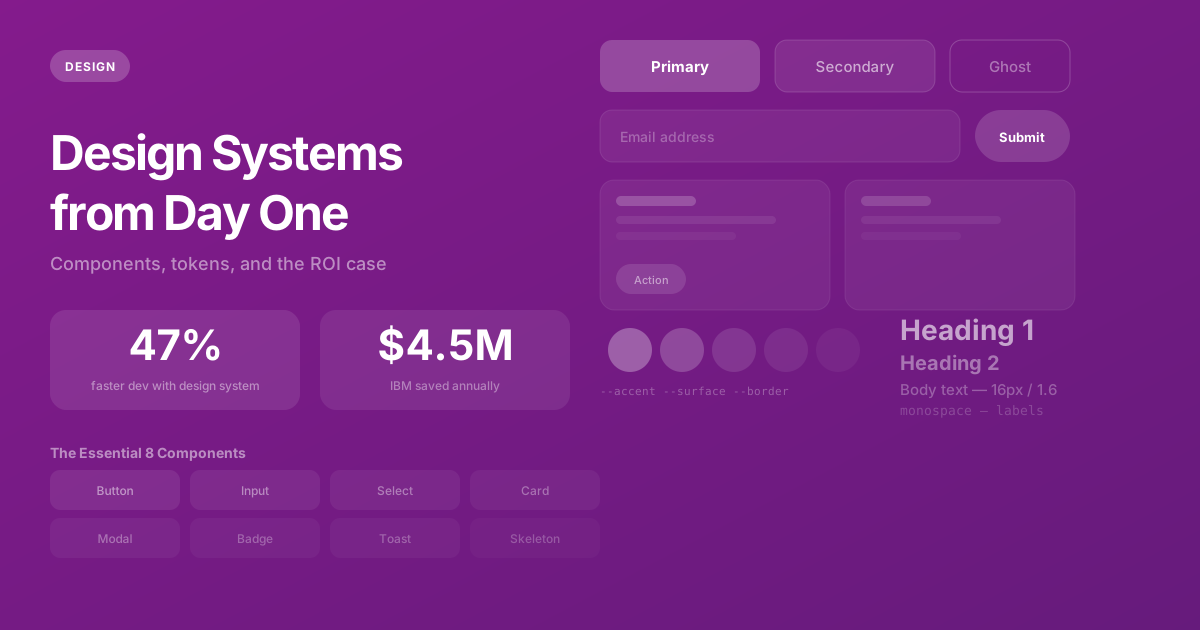
We establish the component library during infrastructure week, not during feature development. This means defining the typography scale, color tokens, spacing system, and building the 8-10 core components every SaaS needs: Button, Input, Select, Card, Modal, Toast, Badge, and Table. These components are built once with proper TypeScript types, accessibility attributes, and responsive behavior — so feature development never gets blocked by "we need to build a button first."
CI/CD Pipeline
Continuous integration is configured on day one. Every pull request triggers TypeScript type checking, ESLint, and automated tests. The main branch auto-deploys to a staging environment that the client can access at any time. Production deployments happen through the same pipeline with a manual approval step. This isn't overhead — it's insurance that prevents "it works on my machine" failures and catches regressions before they reach users.
Weeks 5-8: Feature Sprints
With the infrastructure solid, we build features in two-week sprints. Each sprint has a clear set of deliverables defined at the start, and ends with a demo to the client showing working, deployed functionality — not mockups, not "it's almost done," but live features they can test in the staging environment.
Sprint Prioritization
We prioritize the features that validate the product's core value proposition. If you're building a project management tool, Sprint 1 delivers task creation, assignment, and status tracking. Not integrations. Not notifications. Not settings pages. Those features support the core loop — they don't define it.
Each sprint produces a demoable increment. After Sprint 1, the client can create tasks and assign them. After Sprint 2, they can track projects and view dashboards. After Sprint 3, they can invite team members and manage permissions. By the end of Sprint 4, the product is feature-complete for V1.
The Demo Cadence
Bi-weekly demos serve three purposes: they force us to ship working software on a predictable schedule (no hiding behind "80% done" for three sprints). They give the client early visibility into the product (often surfacing UX issues or priority changes before they become expensive). And they build trust — the client sees continuous, visible progress rather than waiting 12 weeks to find out if we built the right thing.
Weeks 9-10: Polish & Integration
This is where good products become great products. The features are built — now we make them excellent.
- Loading states and skeletons — Every data fetch has a loading indicator. Every page transition feels smooth.
- Error handling — Network failures, validation errors, permission denials, and edge cases all have clear, helpful error messages — not generic "Something went wrong" screens.
- Empty states — A new user's dashboard shouldn't show a blank page. It should guide them through their first action with clear onboarding cues.
- Third-party integrations — Email notifications via Resend, payment processing via Stripe, analytics via Vercel Analytics are connected and tested.
- Database optimization — Queries that were "good enough" during feature development are profiled and optimized. Indexes are added based on actual query patterns.
- Accessibility audit — Keyboard navigation, screen reader compatibility, color contrast ratios, and focus management are tested and fixed.
Weeks 11-12: QA, Performance & Launch
The final two weeks are dedicated entirely to quality and launch preparation. No new features are added during this phase — only bugs fixed, performance optimized, and launch logistics handled.
We target Lighthouse scores of 90+ across all four categories (Performance, Accessibility, Best Practices, SEO). We conduct manual testing across Chrome, Firefox, Safari, and Edge on both desktop and mobile. We run load tests simulating 10× expected initial traffic to ensure the infrastructure handles real-world conditions.
Launch day itself is anticlimactic by design. Because we've been deploying to staging continuously for 10 weeks, the production launch is a DNS configuration change — not a prayer. We monitor closely for the first 48 hours, but the system has been running in a production-like environment for weeks. There are rarely surprises.
What This Timeline Doesn't Include
Twelve weeks gets you a production-ready V1 — not the final product. Features commonly scoped for post-launch sprints include advanced analytics and reporting, white-labeling and multi-branding, public API for third-party integrations, native mobile applications, complex workflow automation, and advanced admin tools.
We plan for this by building the V1 architecture to accommodate these features without requiring a rewrite. The database schema has room for the data these features need. The API layer is structured for extension. The component library can support new UI patterns. V2 development starts from a solid foundation — not a fragile prototype that needs to be torn down and rebuilt.
The Bottom Line
Twelve weeks is tight but achievable when the process is disciplined. Discovery prevents false starts. Infrastructure-first prevents fragile features. Bi-weekly demos prevent misalignment. And a dedicated QA phase prevents embarrassing launch-day bugs. The result is a production-ready SaaS product that's architected for growth — not just for launch.
Need help with this?
We build exactly what this article describes — production-grade digital products for ambitious companies.
Start a Project →